TikTok MCP server for AI assistants and agents
Give ChatGPT, Claude or any MCP client direct access to TikTok videos, creator profiles, comments and trends, without writing a scraper or fighting rate limits


Nine TikTok tools in one MCP server
Ask in plain words. The agent works out which video, which creator and which audience you mean
Creator profiles
Pull the profile of any public account by its username.
Posted videos
Get the videos an account has published in a single request.
Video metadata
Full structured data for one video, taken directly from TikTok’s API.
Comments & replies
Read the comments under a video and the reply thread under each one.
Followers
Who follows an account, returned page by page.
Following
The accounts a user follows, paginated the same way.
Trending now
The videos trending on TikTok at the moment, filtered by country.
Hashtags & challenges
Look up a challenge by name and see the videos posted with its hashtag.
TikTok video download
Direct download links for a TikTok URL in all formats and qualities it comes in, with the cover image.
One MCP server that covers all of TikTok
Chat apps, code editors and your own scripts get the same toolset: hashtags, trends, creator profiles, videos, comments and followers.
Download TikTok videos
Public contentDrop one config block into your client and you are connected. After that, asking for a video is all it takes.
{
  "mcpServers": {
    "savett-mcp": {
      "type": "http",
      "url": "https://api-wh.savett.is/tiktok/mcp"
    }
  }
}Save this TikTok for me: tiktok.com/@…/video/…
download_tiktok_video(url="tiktok.com/@…/video/…")
Done. The video is 1080×1920, and I’ve added the cover image too.
Want the stats for this video, or a list of other clips by the same creator?
Connect the TikTok MCP server to your AI assistant
Pick your app and follow its steps
Works in every client that speaks MCP · only the location of the config file differs.
- Open the MCP settings in your client and find its config file, usually
mcp.json. - Add the Savett entry under
mcpServers:{ "mcpServers": { "savett-mcp": { "type": "http", "url": "https://api-wh.savett.is/tiktok/mcp" } } } - Save the file and restart the client so it loads the new server.
- Open a new chat and try one of these:
- Save the video from tiktok.com/@…/video/…
- Which TikTok videos are blowing up in the US this week?
Works on any ChatGPT plan · Developer mode has to be enabled first.
- Open chatgpt.com and sign in.
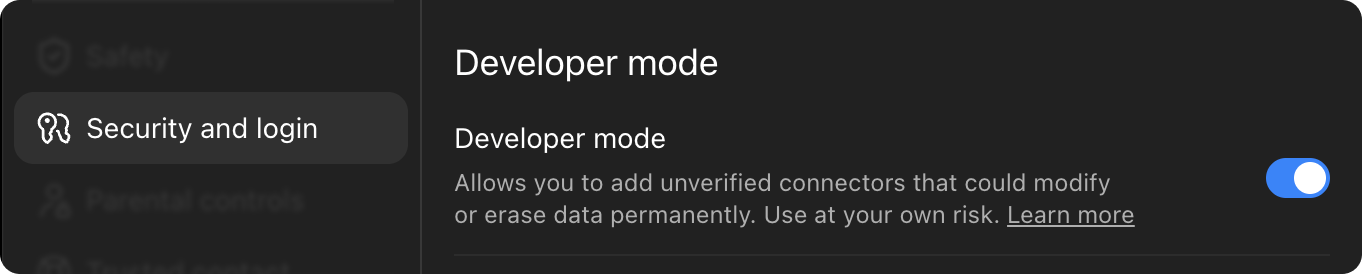
- Go to Settings → Security and login and switch on Developer mode.
- Close the settings and open chatgpt.com/plugins.
- Press + in the top right corner, then choose Create plugin.

- Paste this into the URL field:
https://api-wh.savett.is/tiktok/mcp - Choose OAuth as the authentication method and press Connect (some accounts show Sign in instead).
- A login window opens. Sign in or create an account, then allow access.
- Done. Every chat can now use Savett: pick it in the tools menu when you need it.


There are no commands to memorise. Describe what you want, and ChatGPT calls the matching Savett tool by itself.
Needs a paid Claude plan · Pro, Max, Team or Enterprise.
- Open claude.ai and sign in.
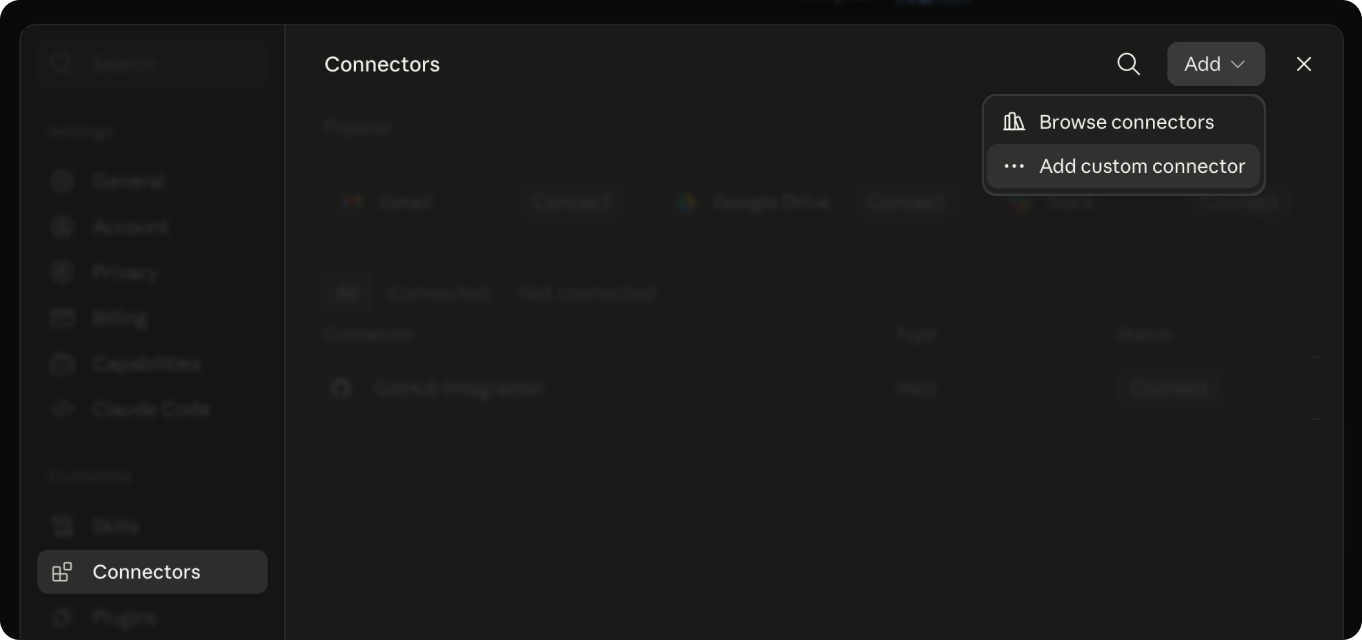
- Click your name in the bottom left corner and go to Settings → Connectors.
- Choose Add custom connector.
- Paste the address below and press Add:
https://api-wh.savett.is/tiktok/mcp - Press Connect, sign in or create an account in the new window and allow access.
- In a chat, click the tools button under the input box and switch Savett on.

Connector missing? Reload the page and check that it is switched on in the chat’s tools menu.
Needs a paid Claude plan · desktop app for macOS or Windows.
- Install the Claude desktop app, open it and sign in.
- Open Settings → Connectors.
- Choose Add custom connector.
- Paste the address below and press Connect:
https://api-wh.savett.is/tiktok/mcp - Sign in or create an account in the browser tab that opens, then allow access.
- Go back to the app. Savett now shows up among your tools.
Custom connectors exist only in recent versions of the app. If you can’t find the option, update Claude.
Terminal · Claude Code must be installed.
- Install Claude Code and sign in; the first run guides you through it.
- Register the server with one command:
claude mcp add --transport http savett-mcp https://api-wh.savett.is/tiktok/mcp - Start Claude Code and type
/mcp. - Pick savett-mcp and choose Authenticate. A login page opens in the browser.
- Sign in or create an account, allow access and switch back to the terminal.
- All set. Tell Claude Code what you need, and it handles the rest.
savett-mcp is only the local name of the server in your list. Call it anything you like.
Something not working?
- The login window doesn’t open, or sign-in fails. Allow pop-ups for this site in your browser and try connecting again.
- Savett stopped answering or disappeared from the tools. Remove the connector and add it again with the same address.
- There is no Connectors section. Check that your plan includes connectors and that the app or site is up to date.
- You got signed out. Sessions expire from time to time. Press Authenticate or Connect to sign in again.
All tools are included in every plan
Your first 50 requests are free, no card required.Start nowPro
$25.00/mo
Included:
- 50,000 requests per month
- Hard limit, no surprise overage charges
- Built-in proxies
- Access to every MCP tool
- Recommended
Ultra
$90.00/mo
Included:
- 250,000 requests per month
- Hard limit, no surprise overage charges
- Built-in proxies
- Access to every MCP tool
Mega
$150.00/mo
Included:
- 1,000,000 requests per month
- Hard limit, no surprise overage charges
- Built-in proxies
- Access to every MCP tool
You pay inside your assistant. In a chat where Savett is connected (ChatGPT, Claude or another client), ask for a payment link and it sends one.
Need more requests? Email us and we’ll set up a custom plan.
Frequently asked questions
Quick answers about connecting Savett to your AI assistant.
- MCP (Model Context Protocol) is an open standard for connecting AI assistants to external tools and data. A server like Savett exposes the tools, and the assistant decides when to call them.
- Any assistant with MCP support. The setup section has step-by-step guides for ChatGPT and for Claude on the web, in the desktop app and in Claude Code; the universal config works for everything else.
- No. Savett MCP only works with public TikTok content, the same as the Savett downloader.
- In any chat where Savett is enabled, ask your assistant for a payment link and it replies with one. This site has no checkout page.
Connect TikTok to your AI assistant
Let your assistant handle TikTok research and video downloads. Setup takes a few minutes, and you keep working in the app you already know.
- All available formats and qualities
- Profiles, videos, comments and hashtags
- Nothing to host, no scrapers to maintain